
Manuals
Find simple, step-by-step guidance for using key features and appliances throughout the home, so you can settle in and enjoy your stay with ease. If you need help at any point, guest support is always available. Details related to door access and lock operation are available on the Check-In / Check-Out page. Note: Both fireplaces are fully operational. However, the kitchen fireplace and the wood-burning fireplace in the main-floor primary bedroom can be a little complex to use. For safety and convenience, guests are generally encouraged not to operate them during their stay. If you’d like to enjoy one, simply reach out to guest support and we’ll be happy to guide you.

Hot Tub
The outdoor hot tub is designed for relaxed evenings and quiet moments under the open sky. How to Use * Fully remove the cover before entering * Use the control panel to adjust temperature or jets * Allow a few moments for changes to take effect before adjusting again Helpful Guidelines * Please shower before use to help keep the water clean * Secure the cover back in place after each use * Avoid glassware in or around the hot tub Enjoy Responsibly * Children should be supervised at all times * If you feel lightheaded or uncomfortable, exit and rest If you need help or notice anything out of the ordinary, guest support is always available.
.png)
Fire Table (Lakefront Cabana)
The fire table in the lakefront cabana is perfect for cozy evenings by the water and relaxed conversations outdoors. How to Use * Remove the steel plate cover from the top of the table * Open the hatch on the table to access the propane cylinder * Ensure the cylinder valve is in the open position * Press the red ignition button while turning the control knob to the on position * If the spark does not ignite, you may use the lighter provided in the kitchen or grill area Helpful Guidelines * Always remove the steel plate cover before lighting * Turn the control knob fully off after use * Allow the table to cool completely before replacing the cover If the Flame Does Not Ignite Occasionally, the propane cylinder may be empty. In this case, it can be easily replaced at a nearby grocery store such as Safeway. If you have any questions or need assistance, guest support is always available to help.

Bar Table Configuration (Main Patio)
The bar table on the main patio is designed to be flexible, allowing you to adapt the space for conversations, dining, or larger gatherings around the fire. How It’s Set Up By default, the two crescent-shaped tables join together to form a complete circle around the cylindrical fire pit. This creates a dual-level table with ample surface space, where all six seats enjoy a front-row view of the flames. Alternate Configurations * S-Shaped Layout Connect the two half-moon tables at their ends to create a flowing, serpentine arrangement. This setup works well for smaller groups and intimate conversations, while still keeping the fire pit accessible from the open side. * Walk-Up / Gathering Layout For larger groups, separate the fire pit and arrange the two C-shaped tables together to form a full circle. This creates a casual walk-up table while still offering a shared dining-style experience. Helpful Tip Feel free to reconfigure the tables based on your group size and how you’d like to enjoy the fire pit. All layouts are designed to remain stable and comfortable when properly aligned. If you need assistance or have questions about rearranging the tables, guest support is always available.

Cantilever Umbrella (Main Patio)
The cantilever umbrella on the main patio is designed to provide flexible shade throughout the day and can be easily adjusted to suit your seating and sun position. How to Use * Use the crank system to open or close the umbrella canopy * Press the adjustment handle to raise or lower the umbrella across multiple height levels * To rotate the umbrella horizontally, press the foot pedal at the base and rotate the umbrella up to 360 degrees Helpful Guidelines * Adjust the umbrella slowly to avoid sudden movement * Ensure the canopy is fully closed when not in use or during strong winds If you have any questions or need assistance with adjustments, guest support is always available.

Smart TVs (Amazon Fire TV – Series 4)
Smart TVs in the home are powered by Amazon Fire TV (Series 4) for easy access to streaming and apps. How to Use * Use the Fire TV remote provided to navigate and control the TV * You can also control the TV from your phone by downloading the Fire TV Remote App * Open the app and pair it with the TV using the code displayed on the TV screen Helpful Tip The mobile app is especially useful if the remote is temporarily unavailable or you prefer using your phone. If you need help setting it up or pairing your device, guest support is always available.

Large TV / Theater room
Smart TVs in the home are powered by Amazon Fire TV (Series 4) for easy access to streaming and apps. How to Use * Use the Fire TV remote provided to navigate and control the TV * You can also control the TV from your phone by downloading the Fire TV Remote App * Open the app and pair it with the TV using the code displayed on the TV screen Helpful Tip The mobile app is especially useful if the remote is temporarily unavailable or you prefer using your phone. If you need help setting it up or pairing your device, guest support is always available.

Cross Trainer (ProForm 735 E Elliptical)
The cross trainer is available for guests who would like to stay active during their stay. How to Use * This equipment is a ProForm 735 E Elliptical * A detailed user guide for the machine is kept near the equipment for your reference * Please review the guide before first use to understand settings and controls Helpful Guidelines * Wear appropriate footwear while using the machine * Adjust resistance and pace gradually * Stop immediately if you feel any discomfort If you have any questions or need assistance, guest support is always available.

Microwave (Viking VMOD)
The kitchen is equipped with a Viking VMOD microwave, designed with a drawer-style opening for ease of use. How to Use * The microwave opens and closes like a drawer * Use the touch panel buttons on the front of the microwave to open or close the drawer * Select your desired cooking settings using the same touch panel Helpful Guidelines * Ensure the drawer is fully closed before starting * Avoid forcing the drawer open or shut manually If you need any assistance while using the microwave, guest support is always available.

Coffee Maker
The kitchen is equipped with a Ninja Coffee Maker for your daily coffee needs. How to Use * This appliance is a Ninja Coffee Maker * A detailed user manual for the machine is kept near the coffee maker for easy reference * Please review the manual before first use to understand brew options and settings Helpful Guidelines * Use only water in the designated reservoir * Turn off the machine after use If you have any questions or need assistance, guest support is always available.

Blender (Ninja)
The kitchen includes a Ninja Blender, ideal for smoothies, shakes, and quick food prep. How to Use * This appliance is a Ninja Blender * A detailed user manual for the blender is kept near the appliance for easy reference * Please review the manual before first use to understand speed settings and operation Helpful Guidelines * Ensure the lid is secured before blending * Do not operate the blender empty * Turn off and unplug after use If you need assistance, guest support is always available.
.jpg)
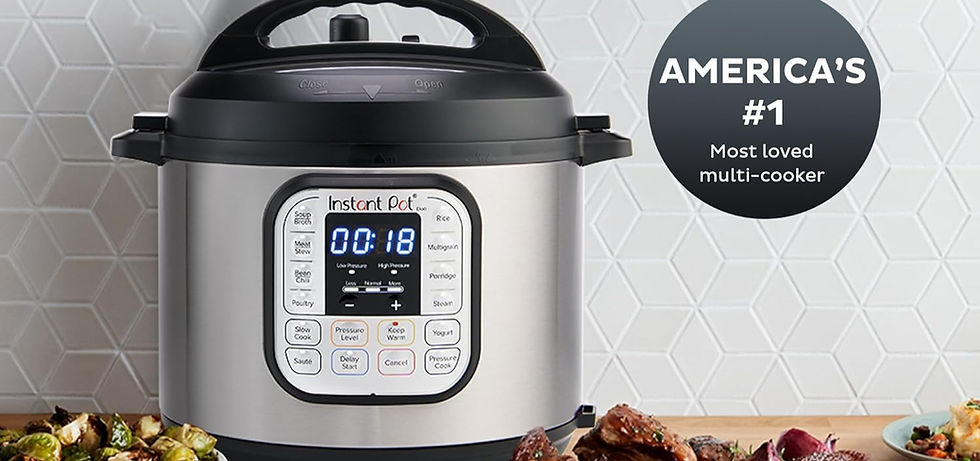
Instant Pot (Instant Pot Duo 7-in-1)
The kitchen includes an Instant Pot Duo 7-in-1 pressure cooker, ideal for quick and convenient cooking. How to Use * This appliance is an Instant Pot Duo 7-in-1 * A detailed user manual for the Instant Pot is kept near the appliance for easy reference * Please review the manual before first use to understand cooking modes and safety features Helpful Guidelines * Ensure the lid is properly sealed before starting * Allow pressure to release fully before opening * Turn off and unplug the unit after use If you need assistance while using the Instant Pot, guest support is always available.

Toaster / Air Fryer / Broiler / Baker (All-in-one)
The kitchen is equipped with a Hamilton Beach 4-in-1 appliance that functions as a toaster, air fryer, broiler, and baker for everyday cooking needs. How to Use * This appliance is a Hamilton Beach 4-in-1 Bake, Broil, Toast & Air Fry Combo * A detailed user manual for the appliance is kept near the unit for easy reference * Please review the manual before first use to understand mode selection, timing, and temperature settings Helpful Guidelines * Use oven-safe cookware only * Allow the unit to cool completely before cleaning * Turn off and unplug the appliance after use If you have any questions while using this appliance, guest support is always available.

Outdoor Lights
String lights across the outdoor patio and lakefront gazebo are set on an automated system and are programmed to turn on automatically at sundown. How It Works * The lights are controlled by smart plugs and should illuminate on their own each evening * No action is required from guests under normal operation If the Lights Don’t Turn On * Please contact us by text or call, and we’ll be happy to assist * As a last resort, the lights can be unplugged from the smart plugs and connected directly to a power outlet If you have any questions or need help at any time, guest support is always available.
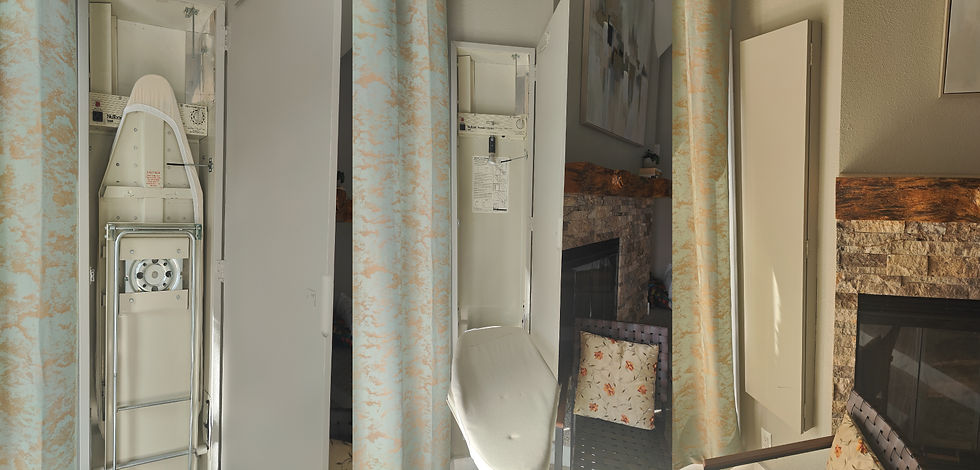
Iron & Ironing Board
A Rowenta iron is available for guest use and is located in the laundry room. Where to Find It * The iron is kept in the laundry room * The ironing board is located in the main bedroom, near the fireplace Helpful Guidelines * Ensure the iron is turned off and unplugged after use * Allow the iron to cool completely before storing it back in place If you need any assistance locating or using the iron, guest support is always available.
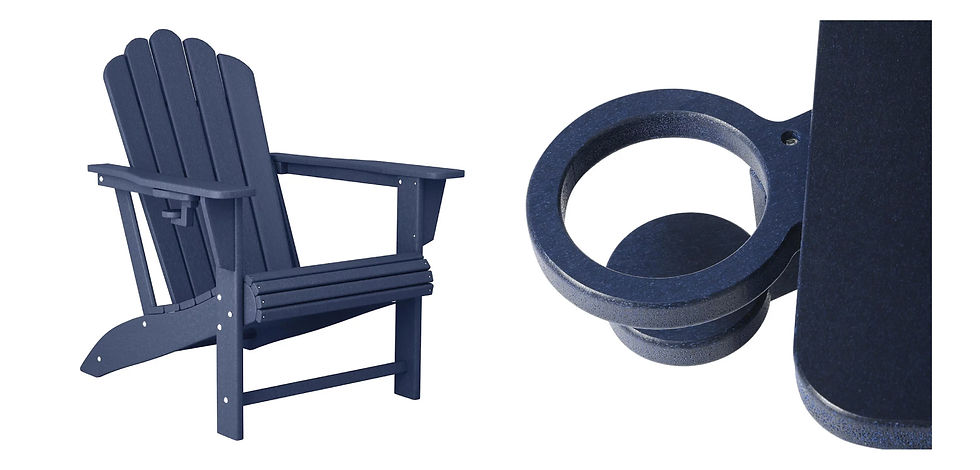
Anorak Chairs
Four comfortable Anorak chairs are available in the lakefront cabana and can be moved to outdoor areas, including the dock by the lake. How to Use * Chairs can be placed around the patio, cabana, or dock as desired * Each chair includes a pull-out cup holder beneath the armrest * Cup holders are suitable for beverages such as beer bottles and wine glasses Important Note * Please return the chairs to the cabana when not in use * Strong winds may blow chairs into the water if left unattended If you have any questions or need assistance, guest support is always available.

Sofa Bed (Living Room)
The sofa beds in the living room are designed to adjust easily for sitting, lounging, or sleeping. How to Use * Adjust the sofa by gently pushing or pulling the seat backs * The backrests can be retracted or extended to change positions * Transition smoothly from a seated setup to a lounging or sleeping configuration Helpful Guidelines * Adjust the seat backs slowly and evenly * Ensure the sofa is fully set in position before use If you need any assistance with the sofa beds, guest support is always available.
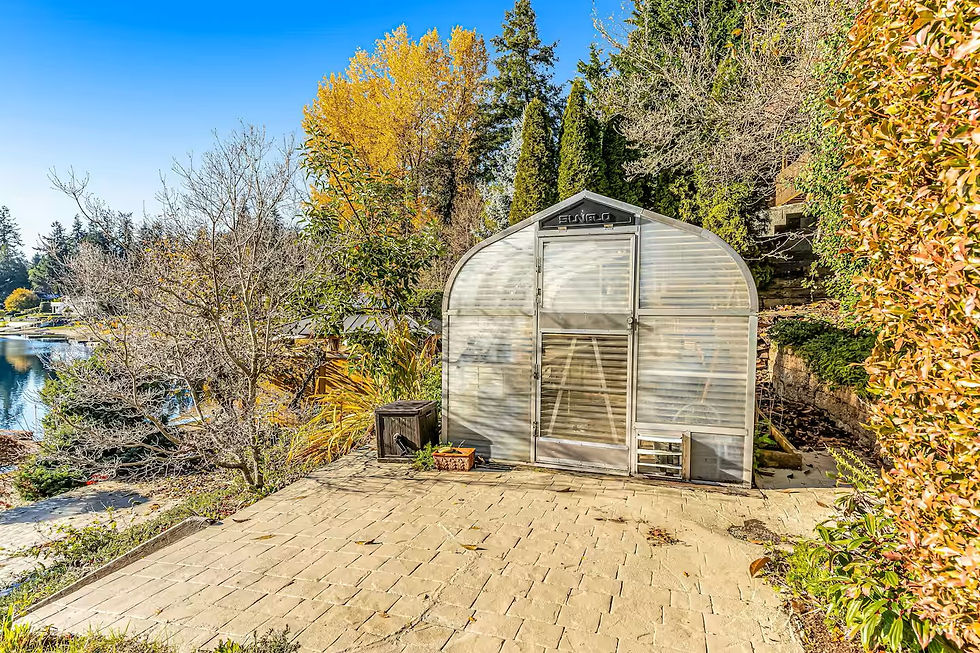
Glasshouse Wares (Lower Gardens)
The glasshouse in the lower gardens is stocked with a variety of equipment available for guest use during your stay. What You’ll Find * Air pumps for inflating paddle boards and water toys * Spare water floaties * Fishing rods * Sun umbrellas * Hoses, rakes, plastic mats, and other garden-use items * Bases for sun umbrellas, located on the dock and throughout the gardens Helpful Guidelines * Feel free to use any equipment as needed during your stay * Please return all items to the greenhouse after use to keep everything organized and accessible If you need help locating or using any of the equipment, guest support is always available.

Workspace Setup 1 (Main Floor)
The main-floor living–bedroom area features an ErGear height-adjustable electric standing desk, designed for a comfortable and efficient work setup. How to Use * Connect your laptop to the docking station provided * The monitor, keyboard, and mouse are pre-connected for easy plug-and-play use * Use the desk controller (shown in the image) to adjust desk height * Saved height presets can be used for quick sit-to-stand transitions This setup allows you to switch seamlessly between relaxing and full workstation mode. If you need help adjusting the desk or connecting your devices, guest support is always available.
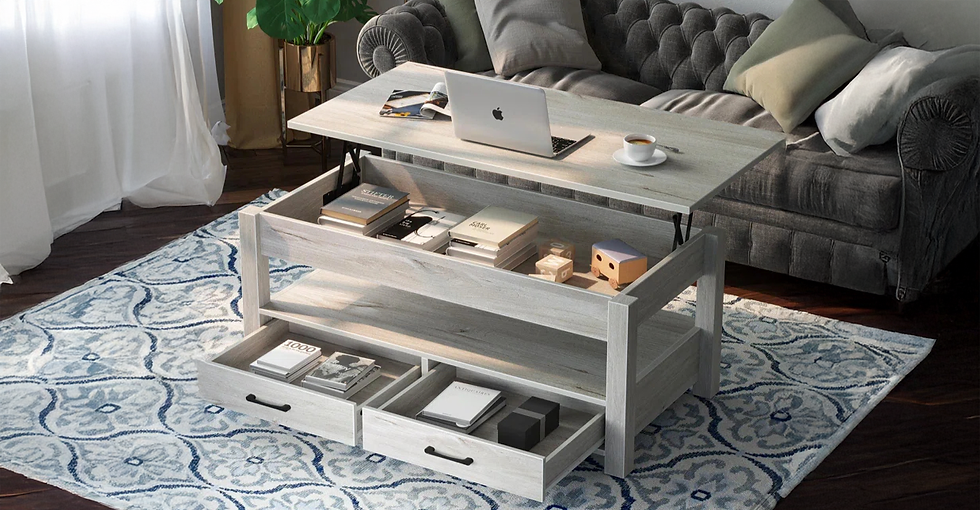
Workspace Setup 2 (Main Floor Bedroom)
The coffee table in the sitting nook of the main-floor bedroom can be easily converted into a functional workstation. How to Use * Lift the tabletop to raise it into an elevated working position * Adjust the height to suit comfortable typing or laptop use * Lower the top back down to return the table to leisure mode This smart, adjustable table allows you to transition seamlessly between work and relaxation without moving spaces.
Operating Fireplace – Living Room
The gas fireplace located in the lower-floor living room provides instant warmth and ambiance at the flip of a switch. How to Use * Locate the electric switch positioned next to the fireplace * Flip the switch to turn the fireplace ON or OFF Helpful Guidelines * Always ensure the fireplace is fully turned OFF before leaving the room * Do not place any objects, cushions, or decor close to the fireplace opening * For a quick visual walkthrough, please refer to the video provided
Operating Fireplace – Bedroom
The gas fireplace in the main-floor bedroom offers added warmth and ambiance and is simple to operate. How to Use * Locate the electric switch positioned next to the fireplace * Flip the switch to turn the fireplace ON or OFF Helpful Guidelines * Ensure the fireplace is fully turned OFF before leaving the room * Do not place any objects, bedding, or decor near the fireplace opening * For a quick visual walkthrough, please refer to the video provided
Fan & Light Controls (Bedroom)
The bedroom fan and lights can be easily controlled using the remote provided, as well as the wall switch near the room’s entryway. How to Use * A remote control is placed next to the fireplace * The blue button with the light bulb icon controls the fan light * The grey center button turns the fan ON or OFF * The main electric wall switch is located near the entryway to the room Helpful Guidelines * Use the remote for daily operation of the fan and lights * Ensure the fan and lights are turned OFF when not in use If you have any questions or need assistance, guest support is always available.
Outdoor Grill (Weber Genesis – Special Edition)
The outdoor cooking area features a Weber Genesis Special Edition grill, designed for high-performance grilling and entertaining. How to Use * The grill includes three gas burners, a side burner, and searing capabilities * The grill is powered by a natural gas line connected at the back * Locate the gas valve near the floor on the right side of the grill * Open the gas valve before starting to cook * Turn the burners on using the self-start ignition * The grill section requires a lighter, which can be found in the kitchen drawer Helpful Guidelines * Always close the gas valve after you are done using the grill for the day * Grill tools, including steel trays and large tongs, are available in the kitchen * For a visual walkthrough, please refer to the video provided If you have any questions or need assistance, guest support is always available.
Air Hockey (Game Room)
An air hockey table is available in the game room for friendly competition and indoor fun. How to Use * The table may have a table tennis top placed on it * Remove and set the table tennis top aside to access the air hockey surface * Ensure the power cable is plugged in before starting * Use the pushers and pucks provided onsite to play Helpful Guidelines * The table features consistent airflow for smooth gameplay * Electronic scorers are built in for easy score tracking * Please return any removed table tops to a safe corner after use If you need any assistance, guest support is always available.
Check In / Check Out
House Rules
House Guides
Parking and Wifi
9924 Clara Blvd SW, Lakewood, WA, 98498


.png)


Amenities
Photo Gallery
Things to do
Guest Reviews
Check In / Check Out
House Rules
House Guides
Parking and Wifi
9924 Clara Blvd SW, Lakewood, WA, 98498
Amenities
Photo Gallery
Things to do
Guest Reviews
+1 (951) 407-0089